The CSS Parent Selector That Eliminates Half Your JS – :has()


The Problem We’ve All Accepted (But Shouldn’t)
For years, CSS had a major limitation:
You couldn’t select a parent based on its children.
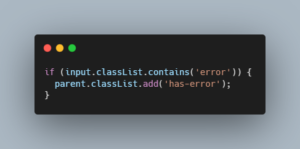
So we ended up writing JavaScript for things like:
- Highlighting a card if it contains an error
- Styling a form group if an input is invalid
- Changing layout based on child presence
Example:
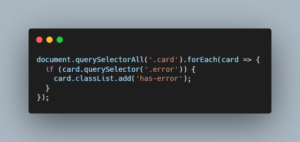
This works—but it’s:
- Imperative
- Harder to maintain
- Unnecessary for UI logic
Enter :has() — The Missing Piece
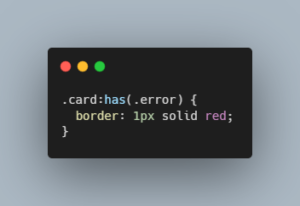
That’s it.
👉 CSS can now react to DOM structure
👉 Parent selection is finally possible
👉 Entire classes of JS logic disappear
What :has() Actually Is (Beyond the Hype)
:has() is a relational pseudo-class.
It allows you to:
- Select an element if it contains something
- Select an element based on its descendants, siblings, or state
Think of it as:
“Select this element if something inside (or related to it) matches a condition.”
Before vs After
❌ Old Way (JS + extra classes)
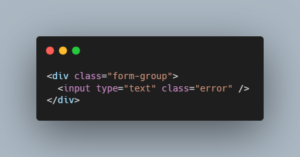
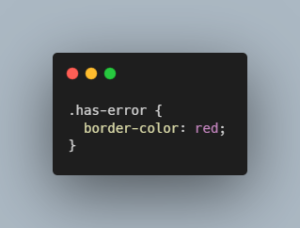
✅ New Way (Pure CSS)
👉 No JS
👉 No extra classes
👉 Declarative and clean
Real-World Use Cases (Where This Shines)
- Form Validation Without JS
.form-group:has(input:invalid) {
border: 1px solid red;
} - Highlight Cards with Specific Content
.card:has(img) {
grid-column: span 2;
} - Navigation Active States
.nav-item:has(a.active) {
font-weight: bold;
} - Conditional Layout Tweaks
.container:has(.sidebar) {
grid-template-columns: 1fr 300px;
}
👉 This replaces layout logic that previously required JS or React conditionals.
React Angle (This is where it gets interesting)
You’ve probably written:
With :has(), you can reduce this:
.card:has(.error) {
border: 1px solid red;
}
👉 Less prop drilling
👉 Less conditional class logic
👉 Cleaner JSX
This is especially useful in:
- Design systems
- Reusable components
- Form libraries
⚡ Performance Reality Check
Now the uncomfortable truth:
👉 :has() is powerful—but not free
Because the browser has to:
- Look inside elements
- Recalculate styles dynamically
This can be expensive if abused.
✅ When it’s safe
- Scoped selectors (.card:has(.error))
- Small DOM trees
- UI-level conditions
❌ When it’s risky
- Global selectors (body:has(…))
- Deep nesting
- Large dynamic DOM updates
🚨 Gotchas Nobody Mentions
- Overusing :has() can hurt performance
Avoid:
body:has(.modal-open) {
overflow: hidden;
}
👉 This forces browser-wide recalculations - Specificity can get tricky
:has() inherits specificity from its argument.
.card:has(.error)
This can unexpectedly override other styles. - Browser Support (Important for jobs)
Modern browsers support it well—but always check:
Older enterprise environments may lag
👉 For job readiness: mention fallback strategies in interviews
🧠 Opinion (This is your edge)
Most developers still think:
“CSS can’t handle logic.”
That’s outdated.
With :has(), CSS becomes:
- Context-aware
- State-aware
- Structurally intelligent
If you’re still defaulting to JS for UI state that depends on DOM structure:
You’re writing more code than necessary.
🔥 Where This Actually Replaces JS
You can eliminate JS in:
- Form validation UI
- Parent-based styling
- Conditional layouts
- Simple state reflection
But NOT:
- Business logic
- Async flows
- Complex interactions